
Printing Services
Need posters, flyers, invitation cards, or bulletin inserts printed for your church? Our production printer can handle almost anything. Please note the guidelines listed below.
Guidelines for designing your own materials for printing
Document Requirements
- All print jobs need to be sent as “Print Quality” PDF files.All print jobs need to be sent as “Print Quality” PDF files.
- Files submitted for printing should be at 300dpi. (dots per inch) For example, a poster to be printed on 8½” x 11” paper should be at least 2400 x 3150 pixels.
Printing Margins
- No printer is capable of printing all the way to the edge of a page. This “unprintable” area is usually referred to as the “printing margin.” (Not to be confused with a “design margin”) The easiest and most cost-effective way to design a poster is to create your layout with a ¼” white margin on all sides. For example, if you are creating a poster that is to be printed on standard 8½” x 11” paper, the inclusion of a ¼” printing margin on all sides means your actual printing area will only be 8” x 10½”.
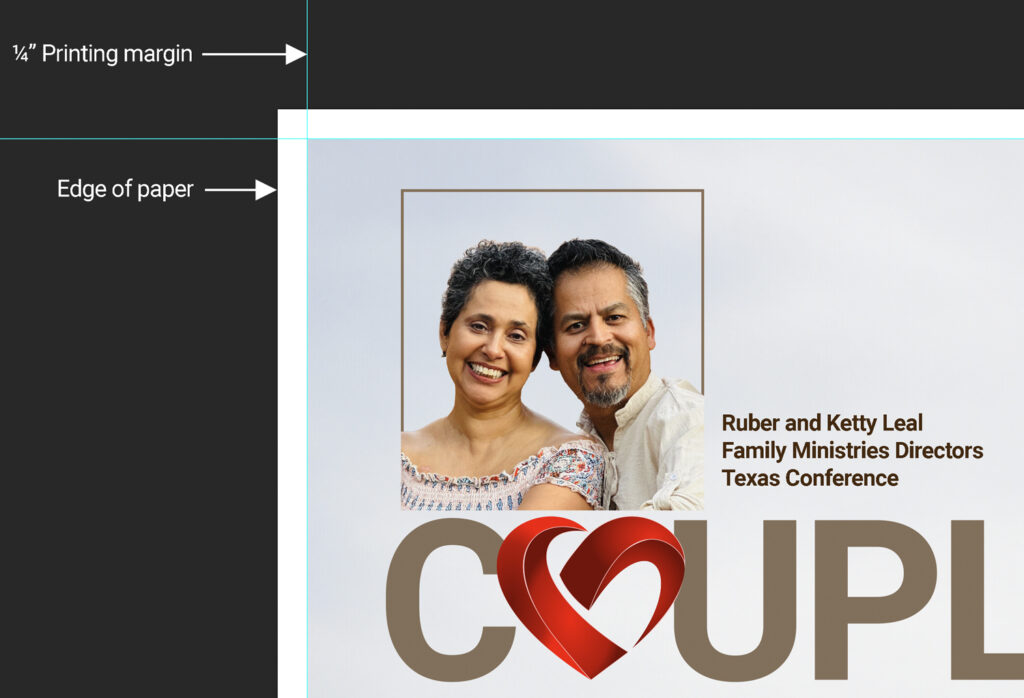
- If you wish to create a document that has ink all the way to the edges (known as “Full Bleed”) the paper will have to be trimmed. Requests for “full-bleed” printing should be discussed with the communications team in advance to ensure your document meets printing guidelines. Full bleed printing will increase the cost of production.
If you are using Canva to create documents
Canva is a widely used design platform for creating materials such as posters, flyers, and other promotional documents. While the platform is user-friendly and offers a free basic version, it is important to follow specific preparation steps before submitting Canva files for professional printing.
We strongly recommend watching the tutorial video below to ensure your designs are properly set up prior to sending any Canva documents to the Conference Office for printing:
How to Set Up Your Canva Designs for Print
Lead Times (print-ready)
If documents are in a “ready-to-print” PDF format, printing requests should be made at least 2-5 days in advance.
** Please note, these lead times are subject to change based on workload and time of the year.
Design Services
If you need help creating content, we are here to help! Please reach out to one of our Communications Team members, and we can make your ideas a reality. A few guidelines that can make our job easier:
- Have a clear idea of what you want to communicate.
- Provide us with as much detail as possible. (who, what, where, when.)
- Provide us with good-quality, high-resolution photos. (when applicable)
- Plan ahead! The design process can take several days to move from concept to finished product.
Lead Times (design & layout)
Requests should be made a minimum of 7 days before they are needed. Please note that this lead-time is only for design and layout. Printing will add additional time.
** Please note, these lead times are subject to change based on workload and time of the year.